

Understanding Unicode helps in using both Swift’s String and NSString APIs and their underlying behaviors.
1. A short history of Unicode (with key dates)
Before Unicode, computing was a patchwork of character sets: ASCII in the US, ISO-8859 variants in Europe, Shift-JIS in Japan, KOI8-R in Russia, and many others. There was no universal representation of human scripts. Unicode was created with a clear goal: one universal character set for all present and ancient scripts, encoded in multiple efficient ways.
Major milestones:
1963 — ASCII created (7-bit). Good for English, useless for anything else.
1987 — Unicode project begins, aiming to create a unified character set for all languages.
1991 — Unicode 1.0 released (first official version).
1996 — UTF-8 invented by Ken Thompson and Rob Pike; becomes the dominant web encoding.
2000s — Widespread adoption across OSes, browsers, mobile devices.
2010s — Emoji explosion, including ZWJ (zero-width joiner) sequences and multi-person, multi-skin-tone combinations.
Swift 5 (2019) — Swift adopts a stable UTF-8-based String storage.
2. What are UTF encodings?
Unicode defines code points: conceptual identifiers like U+0041 (“A”) or U+1F600 (“😀”). These are not bytes and not glyphs — just unique identifiers for characters.
Encodings define how to store these identifiers in bytes.
Example: Code point U+41 (character: “A“)
UTF-8 → 0x41 (1 code unit, each of 1 byte, gives 1 bytes)
UTF-16 → 0x0041 (1 code unit, each of 2 bytes, gives 2 bytes)
UTF-32 → 0x00000041 (1 code unit of 4 bytes, gives 4 bytes)
Example: Code point U+1F600 (emoji: “😀”)
UTF-8 → 0xF0 0x9F 0x98 0x80 (4 code units, each of 1 byte, gives 4 bytes)
UTF-16 → 0xD83D 0xDE00 (2 code units, each of 2 bytes, gives 4 bytes)
UTF-32 → 0x0001F600 (1 code unit, each of 4 bytes, gives 4 bytes)
Encodings exist because different trade-offs matter: compactness, speed, compatibility.
3. UTF-8 vs UTF-16 vs UTF-32
UTF-8
number of code units per code point: 1 to 4
code unit: 1 byte
maximum size in bytes: 4
maximum size in bits: 32
ASCII and Latin text remain compact (ASCII stays 1 byte; Western European characters usually 2 bytes)
Standard on Linux, macOS, iOS, web
UTF-16
number of code units per code point: 1 to 2
code unit: 2 byte
maximum size in bytes: 4
maximum size in bits: 32
Basic Multilingual Plane (BMP - most of characters used in Western European and China/Japan/Korean CJK languages) fits in 2 bytes
Supplementary characters (emoji, flags) use surrogate pairs
Historically used by Windows, Java, .NET, NSString
UTF-32
number of code units per code point: 1
code unit: 4 byte
fixed size in bytes: 4
fixed size in bits: 32
Unicode code point directly as a 32-bit integer.
Simplest for indexing
Wasteful in RAM and storage
Rarely used outside internal processing
4. Swift’s String is UTF-8
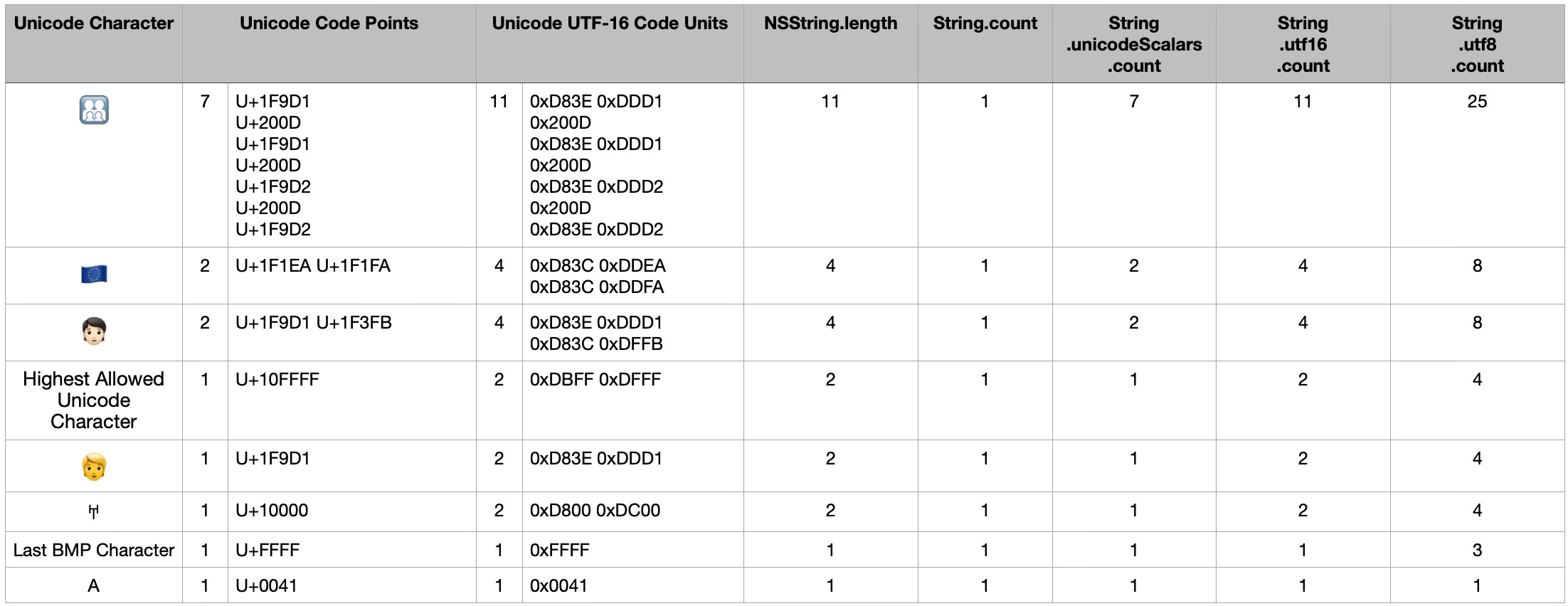
Since Swift 5, String stores its contents in memory using UTF-8 encoding as the native representation. When you call String.count, Swift does not count bytes or Unicode scalars, it counts extended grapheme clusters, meaning the number of characters as a human perceives them.
Example:
let s = "🇵🇱" // it is composed emoji of two regional letters 🇵: U+1F1EA and 🇱: U+1F1FA
print(s.utf8.count)  // 8 code units, 8 bytes
print(s.utf16.count) // 4 code units, 8 bytes
print(s.unicodeScalars.count) // 2
print(s.count)       // 1 character
5. NSString uses UTF-16
Whenever you use Foundation, Objective-C interoperability comes into play. NSString encodes text using UTF-16, and its API operate at the UTF-16 code-unit level. This leads to:
.length returning number of UTF-16 code units, not characters
Indexing based on those UTF-16 code units
Example:
let flag = "🇫🇷" as NSString
// 2 code points: F(U+1F1EB) R(U+1F1F7)
// 4 UTF-16 code units: F - (D83C) (DDEB) R - (D83C) (DDF7)
// 8 Bytes in total
print(flag.length) // 4 UTF-16 code units
6. Swift is a wrapper around NSString when Foundation is imported
When you write:
import FoundationString gains automatic bridging to NSString. This has several consequences:
When using the String API, it becomes difficult to know whether autocomplete suggestions come from String or from NSString.
It is possible to break a Swift String by using certain NSString APIs, because they operate on UTF-16 code units rather than Swift’s grapheme-cluster–safe model.
7. How NSString APIs can break a Swift String
Take a flag emoji. It’s composed of two Unicode Regional Indicator symbols.
Swift counts this as one extended grapheme cluster.
NSString.length, however, counts UTF-16 code units, so the same flag becomes four UTF-16 units.
NSString methods such as substring(with:) operate on UTF-16 code units, not grapheme clusters.
If you request a substring of length 1, you slice half of a surrogate pair of the first Unicode Regional Indicator symbol , producing an invalid string.
var s = "🇵🇱"
let ns = s as NSString
let broken = ns.substring(with: NSRange(location: 0, length: 1)) // half of the regional letter P
prints nothing

var s = “🇵🇱”
let ns = s as NSString
let ok = ns.substring(with: NSRange(location: 0, length: 2))
prints full regional letter 🇵
Most developers never encounter these issues, but when working with emoji, flags, or ZWJ sequences, careless use of NSString APIs can corrupt text because they operate on UTF-16 code units, not Swift’s grapheme-cluster-safe model.
8. Character limits in TextFields: stay aligned with your backend
User-input character limits only work if the application and backend count text the same way. If the backend API documentation does not specify what is being counted, extended grapheme clusters, Unicode code points, UTF-8 bytes, or UTF-16 code units, you must either determine the method empirically or ask the backend team directly.
8. Key facts
Swift’s String stores data in UTF-8.
NSString stores data in UTF-16.
Importing Foundation makes Swift.String transparently bridge to NSString.
Many NSString APIs operate on UTF-16 code units, not Unicode characters.
NSString’s UTF-16 APIs can easily break complex Unicode sequences (flags, emojis, ZWJ).
Use native Swift String methods whenever possible.
If someone asks, “What encoding should I use for String or Data?” → Default answer: UTF-8.
Related post:
Unicode for Software Developers

Unicode is a character-encoding standard maintained by the Unicode Consortium. It provides a universal foundation for processing, storing, and exchanging text in any language across modern software systems. Before Unicode existed, computers used a long chain of incompatible encodings: ASCII, then ISO-8859 variants, and earlier systems such as ITA2 (Baud…
Useful links:
https://www.compart.com/
https://codepoints.net/
https://emojipedia.org
https://forums.swift.org/t/can-encoding-string-to-data-with-utf8-fail/22437/5
https://www.swift.org/blog/utf8-string/
https://en.wikipedia.org/wiki/UTF-8
https://en.wikipedia.org/wiki/UTF-16
https://en.wikipedia.org/wiki/Unicode